Google Secret Manager
The documented deployment stores the Twilio Auth Token in Secret Manager and supplies it to Cloud Run through a secret-backed environment variable. The source reads the value at runtime.
GOOGLE CLOUD / CONVERSATIONAL AI
Maya is a business phone solution for a working technology firm. It captures caller details, uses Gemini on Vertex AI to understand project needs, and routes callers toward a consultation, an accepted live transfer, or a message for follow-up. BigQuery adds structured event and lead storage.
BIGQUERY INTEGRATION DEPLOYED · POWER BI NEXT
“My website is unstable. I need to move from AWS to Google Cloud without downtime.”
VERTEX AI / GEMINI
Context that carries forward.Relevant questions. Corrections remembered.
SOLUTION ARCHITECTURE / AT A GLANCE
Twilio handles the call, Dialogflow CX manages the conversation, and authenticated Cloud Run fulfillment coordinates AI answers, customer actions, and structured BigQuery writes.
The documented deployment stores the Twilio Auth Token in Secret Manager and supplies it to Cloud Run through a secret-backed environment variable. The source reads the value at runtime.
The setup grants the backend identity access to the Twilio secret. Dialogflow’s exported webhook configuration uses service-agent ID tokens for Cloud Run invocation.
The transfer Function uses Twilio’s Protected visibility. Unsigned requests are checked by the platform before the call-screening handler runs.
01 / THE CUSTOMER PROBLEM
The first call should help a customer move forward without making them repeat their story or navigate a long menu.
I built Maya for a real business workflow: understand the inquiry, connect the caller to the right next step, and preserve context for follow-up. Dialogflow manages the conversation while the backend keeps actions separate from generated replies.
02 / INSIDE THE PHONE EXPERIENCE
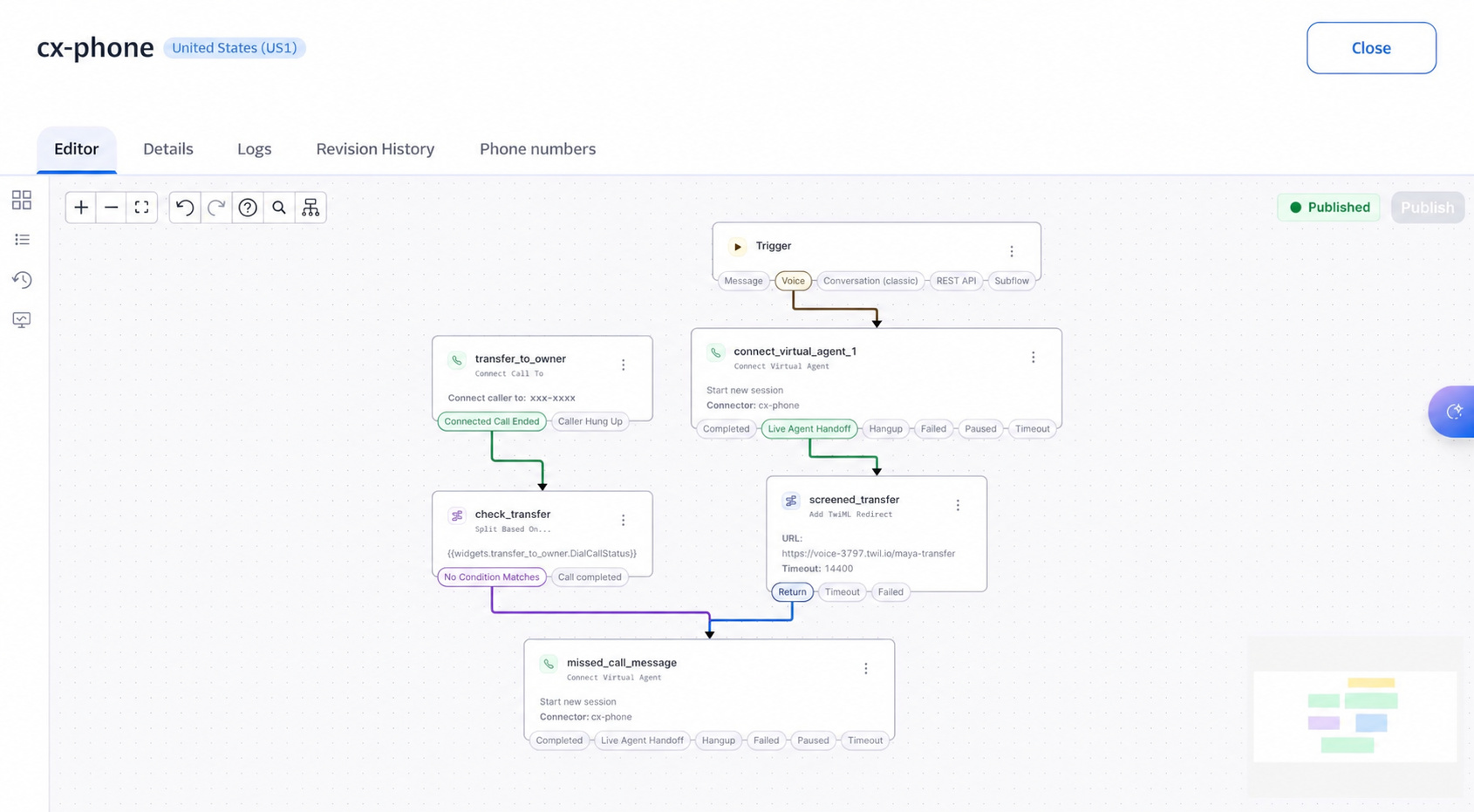
The Twilio Studio flow connects callers to Maya, then screens live handoffs with a private press-1 prompt. I confirmed the transfer works after correcting the destination number. Unaccepted transfers have a return route to Maya’s message-taking session.
Press-1 transfer confirmed. Fallback and delivery checks next.
03 / EXPLORE THE CONVERSATION
Step through an illustrative call. The example explains the current design and does not contact the live assistant, place calls, or send messages.
EXAMPLE CONVERSATION · ILLUSTRATIVE CONTENT · NO LIVE REQUESTS
TWILIO → DIALOGFLOW CX
The phone experience introduces the business, captures a name, and collects or confirms a callback number.
CLOUD RUN → VERTEX AI
Gemini receives the recent conversation and structured context, then answers a question or asks for one useful missing detail.
CONVERSATION HISTORY + EXTRACTION
The dialogue loop updates the structured discovery details as the caller clarifies their request. A live model evaluation demonstrated the AWS-to-Azure correction.
BOOKING / HANDOFF / MESSAGE
Booking links go through Twilio after permission. Callers can ask for a person or leave a message. The screened transfer now has a published return route to Maya for message capture.
Dialogue is illustrative. Model evaluations and phone tests are recorded separately in the validation section below. A booking-link text is not a completed appointment.
Step 1 of 4: Contact
04 / THE PROJECT ARCHITECTURE
Twilio handles the phone channel and live transfer. Dialogflow manages state, and an authenticated Cloud Run webhook coordinates Gemini, customer actions, and BigQuery event and lead writes.
Connects incoming calls to Maya and routes live handoffs to the owner.
Manages intents, contact intake, conversation pages, and outcome routing.
Coordinates authenticated fulfillment, notifications, and structured writes to BigQuery.
Uses conversation context for service answers, corrections, and project summaries.
Dialogflow invokes the private Cloud Run backend using service-agent ID tokens. A dedicated runtime service account accesses Vertex AI, and the Twilio Auth Token is referenced from Google Secret Manager as a runtime secret. Current IAM grants, secret versions, and caller-data retention remain operational verification items.
A minimum Cloud Run instance is kept warm to reduce startup pauses. Conversational model requests use minimal thinking, an eight-second limit, and no automatic retries. This controls one part of the call’s latency.
05 / CURRENT BUILD STATUS
A working phone integration with screened transfers, a published message-return route, and deployed BigQuery ingestion. Power BI is the next milestone.
IMPLEMENTED + EXERCISED
WIRED / VALIDATION NEXT
NEXT MILESTONE
DEPLOYED / BIGQUERY
BigQuery is now part of Maya’s cloud architecture. Event and lead tables, deduplicated reporting views, and Cloud Run ingestion are deployed. The backend captures structured observations for service demand and business follow-up, with Power BI reporting as the next milestone.
Deployment confirmed November 1, 2026. The first live database write remains to be verified. Booking-link sends, accepted transfers, and confirmed appointments remain distinct outcomes.
Checkpoint: November 1, 2026. Phone-transfer and SMS observations are owner-reported tests. The Studio screenshot shows published return wiring. BigQuery tables, views, and backend ingestion are deployed; live data writes remain unverified. Appointment selection happens in Calendly. View the current project checkpoint ↗
06 / DEVELOPMENT TIMELINE
Built in stages, with API checks, model evaluation, and real calls shaping the next change. October–November 2026.
Built the intent, required form capture, welcome response, and booking-link ending.
Added FastAPI, structured Gemini discovery, Docker packaging, and local health checks.
Deployed Cloud Run fulfillment and connected Dialogflow CX to Twilio’s native voice channel.
Added contact intake, shorter prompts, booking texts, lead alerts, and message/handoff handlers.
Added conversation history, correction handling, reviewed policy answers, and live model evaluation.
Tested the cell transfer and added transfer-status routing.
Published press-1 screening and the Return route to Maya. Corrected the destination number and confirmed the transfer works.
Created event and lead tables, reporting views, and dataset access. Deployed the ingestion-enabled backend to Cloud Run.
07 / VALIDATION & DESIGN DECISIONS
I’m validating the conversation and its cloud integrations together: what the customer says, which details are captured, and what actually happens next.
LATEST CHECKPOINT
November 1, 2026
The backend suite covers contact intake, conversation orchestration, booking and message actions, failure paths, generated configuration, and BigQuery analytics. Model, notification, and database responses are mocked in these tests.
The latest shared Vertex evaluation completed 13 requests in 1.20–5.32 seconds each. It exercised correction memory, clarification, booking, and message requests. These are generation times from one evaluation, not full-call latency or a production benchmark.
The owner confirmed the press-1 transfer works and previously shared received booking and handoff texts. Ignored/declined calls through the new route and full message delivery remain to be verified. Provider acceptance is tracked separately from delivery, and an SMS link does not create an appointment.